


 Esta súper oferta termina en




Artículo: AMZ-B077P6BQP7
XP-Pen
XPPen - Tableta de dibujo Deco 01 V3 actualizada, 16384 niveles de presión con lápiz óptico sin batería, tableta gráfica OSU de 10 x 6 pulgadas, 8 teclas de acceso rápido para arte digital, enseñanza | Battery-Free Stylus, 8 Keys for Digital Art, Teaching, OSU, Mac, PC, Android, Chromebook, Designed for Beginners
Estilo:
con teclas de acceso directo
Tamaño:
L
Detalles del producto
Disponibilidad
En stock
En stock
Peso con empaque
1.25 kg
1.25 kg
Devolución
Si
Si
Condición
Nuevo
Nuevo
Producto de
Amazon
Amazon
Viaja desde
USA
USA
Sobre este producto
- 1. Recordatorio importante La tableta de dibujo Deco01V2 de XP-PEN debe estar conectada a una computadora portátil/de escritorio/Chromebook para funcionar, es compatible con Windows 10/8/7 (32/64 bit), MAC OS 10.10 o superior, Chrome OS 88.0.4324.109 y sistemas operativos superiores. 2. Consejos de conexión Tu portátil/computadora de escritorio necesita tener un puerto USB-A disponible para la conexión. Si su computadora no tiene puerto USB-A, entonces necesita un convertidor adicional para la conexión, como USB-C a USB-A, etc. Depende de los puertos que tenga tu laptop o computadora de escritorio. 3. Instale el controlador XP-PEN en su computadora 1-Antes de la instalación del controlador: Retire el controlador de otra marca de su computadora y reinicie antes de instalar el controlador XP-PEN, o habrá problemas de conflicto del controlador. 2. Descarga del controlador: Nuestro controlador se actualizará regularmente, así que ve a nuestro sitio web oficial para descargar el controlador más reciente e instálalo en tu computadora. 3-Para usuarios de Windows: cierre todos los programas de dibujo y ejecute el controlador XP-PEN como administrador al instalar. (IMPORTANTE) 4. Para usuarios de Mac Mojave (10.14), Catalina (10.15) y versiones superiores del sistema operativo: El sistema operativo Mac Mojave (10.14) o superior se ha actualizado en la sección de seguridad, tienes que poner los programas recién descargados en la lista de accesibilidad primero para usarlos normalmente. Para los detalles de los pasos, consulta la sección de preguntas frecuentes en el sitio web de XP-PEN. 5. Servicio post-venta de XP-PEN Por favor, consulta la guía rápida o busca XP-PEN en línea para encontrar una manera de contactarnos para obtener más ayuda siempre que tengas problemas con el uso de la tableta gráfica Deco01V2, ¡siempre estamos listos para ayudar! XP-PEN proporciona una garantía de un año y soporte técnico de por vida. 6. Programas Instala un programa en tu computadora antes de crear arte/enseñar en línea/trabajar remotamente. Programas de dibujo gratuitos como gimp, firealpaca, krita, medibang, etc. O registra tu tableta gráfica xppen Deco01V2 en la página de xp-pen para solicitar un programa ArtRage Lite, Explain Everything.
₡ 31,523
27% OFF
₡ 23,117
IMPORT EASILY
By purchasing this product you can deduct VAT with your RUT number
★ APPLIES FRANCHISE
₡ 31,523
27% OFF
₡ 23,117
 Llega en 5 a 10 días hábiles
Con envío
 Tienes garantia de entrega
Este producto viaja
de USA  a tus manos en

a tus manos en
Conocé más detalles
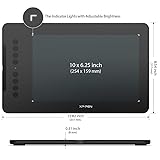
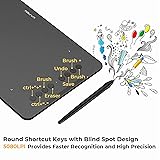
Niveles de presión de 16K primero en su clase: El lápiz digital actualizado cuenta con 16,384 niveles de sensibilidad a la presión y soporta hasta 60 grados de inclinación, ofreciendo líneas más suaves y sombreado para una experiencia de dibujo natural. Sin necesidad de batería ni carga, funciona como un bolígrafo real, por lo que es fácil para los principiantes crear sin esfuerzo. Esta funcionalidad ayuda a los artistas novatos a desarrollar sus habilidades y explorar su creatividad sin la intimidación de herramientas complejas Diseñado para principiantes: esta tabla de dibujo diseñada con 8 accesos directos personalizables para usuarios diestros y zurdos, las teclas rápidas crean una plataforma de trabajo altamente ergonómica y práctica Perfectamente adaptada para Android: la tableta de arte XPPen Deco 01 V3 admite conexiones con dispositivos Android que ejecutan la versión 10.0 y superior. Se recomienda descargar la aplicación Android XPPen Tools, que se adapta a la relación de aspecto de la pantalla de tu smartphone, asegurando un mapeo preciso. También admite mapeo en pantallas de Android con diferentes relaciones de aspecto en modo vertical Gran espacio de dibujo, inspiración más grande y audaz: este extenso bloc de dibujo de 10 x 6.25 pulgadas te ayuda a romper el límite entre las teclas de acceso directo y el área de dibujo Conectividad fácil para principiantes: El Deco 01 V3 ofrece conectividad USB-C a USB-C, además de adaptadores para USB C. Esto asegura una conexión fácil a varios dispositivos, permitiendo a los artistas principiantes configurarse rápidamente y enfocarse en su creatividad sin preocupaciones de compatibilidad. Ya sea que se use una laptop, tableta o computadora de escritorio, el Deco 01 V3 proporciona una experiencia sin problemas, lo que lo convierte en una opción ideal para aquellos que recién comienzan su viaje en el arte digital Ligera y portátil: La tableta Deco 01 V3 es de solo 8 mm de grosor, lo que la hace ligera y fácil de llevar. Perfecto para principiantes, cabe fácilmente en tu mochila, permitiéndote practicar el dibujo o tomar notas donde sea que te llegue la inspiración. Su tamaño compacto fomenta el uso frecuente, ayudándote a desarrollar tus habilidades sobre la marcha Tableta de Dibujo Digital: Fuerte Compatibilidad - La Deco 01 V3 es compatible con Windows 7 (o posterior), Android 10.0 (o posterior), macOS 10.13 (o posterior), Chrome OS 88 (o posterior) y Linux. También es compatible con muchos de los principales software de diseño, como Photoshop, $Al, Painter, llustrator y Clip Studio, etc. *Por favor actualice primero su Windows a la versión 11 o Mac OS a la versión 12 Tableta Gráfica: Alta tecnología IC - Hemos adoptado la última tecnología IC, para hacer que las líneas fluyan más suavemente y funcionen mejor. El Deco se ilumina en los extremos del área de dibujo, por lo que puedes crear, incluso en la oscuridad Lo que obtienes: 1 tableta de dibujo Deco 01 V3, 1 lápiz capacitivo, 10 plumillas, 1 soporte para lápiz capacitivo, 1 guante, 1 película protectora, 1 cable USB-C a USB-A, 1 adaptador USB a USB-C
Compra protegida
Disfruta de una experiencia de compra segura y confiable
 Garantía de entrega
Con Tiendamia todas tus compras cuentan con Garantía de Entrega o devolución total de tu dinero.
Compras 100% seguras y garantizadas, para que pidas lo que sueñas y lo recibas del mundo a tu puerta.
Tarjetas de Débito y Crédito
Pagando en Colones ( ₡ )

Visa

Mastercard

American Express
Pagos a través de PayPal
Compra procesada en dólares con dinero en cuenta o tarjetas internacionales.

PayPal
