






 Garantía de entrega






Artículo: AMZ-B087TDN2FL
AIFUSI
Video Capture Card, USB Capture Card Device, Audio Video Converter Grabber for RCA to USB-Convert VHS Mini DV VCR Hi8 DVD to Digital, for PC TV Tape Player Camcorder, MAC Windows Vista Compatible
Detalles del producto
Disponibilidad
Sin Stock
Sin Stock
Peso con empaque
0.20 kg
0.20 kg
Devolución
No
No
Condición
Nuevo
Nuevo
Producto de
Amazon
Amazon
Viaja desde
USA
USA
Sobre este producto
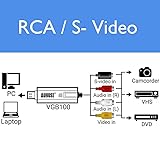
- AIFUSI VHS to Digital Converter VCR TV to DVD Converter for PC (USB 2.0) If you don't have a CD drive,please download it on the line. https://drive.google.com/open?id=1jlN8965HxpthPclv2FTvxiPV3U4MgYWk Specification: ◆ Plug & Play ◆Chip Model: UTV007 ◆Support NTSC/PAL video format ◆Support high quality video resolution NTSC: 720x480@30fps, PAL: 720x576@25fps ◆Support input Formats: record in DVD+/-R/RW, DVD+/-VR, and DVD-Video ◆Video input: One RCA composite, One S-video ◆Audio input: Stereo audio(RCA) ◆Support output Formats: DV, AVI, MPEG, WMV, VCD, DVD ◆Dimension: (L)88mm x (W)28mm x (H)18mm, portable and easy to store, plug &play Package includes: * 1 X USB VIDEO AUDIO CAPTURE ADAPTER VHS TO DVD HDD TV CARD * 1 X User Manual * 1 X CD-ROM * 1 X USB extension cable Video Problems No video: -- Check your cable connections to make sure they are secure. -- Verify you are connecting your cables to the ports labeled „Output‟ on your video player. -- Verify you are only connecting one type of video cable, RCA (yellow) or S-Video. -- Verify the output ports of your video player work by testing them with your television. -- Verify the USB 2.0 VIDBOX capture device is plugged into your computer directly and not through a USB hub. -- Check your video & audio device settings from the Record Settings control panel (see Step Two of the Advanced Mode – Capture section). -- Verify your video cable connections setting by clicking the „Settings‟ button next to the Video Device listing (see Step Two of the Advanced Mode – Capture section). -- Disconnect additional monitors Black & White video: -- Verify your video tape was recorded in the same video standard format for your region. If it was not, see the Converting PAL/NTSC (and other video standards) section in the appendix.

Sin Stock
Selecciona otra opción o busca otro producto.
Este producto viaja
de USA ![]() a tus manos en
a tus manos en
![]()
 a tus manos en

Conocé más detalles
【Video Capture Card Purchse Note】- The CD is not necessary, if you don’t have a CD drive, we recommend that you download OBS (or potplay).They can be downloaded for free online. If you use on Mac, there is no need to downlaod any drive or software. MAC's own software - QuickTime player which can handle video conversion. (You can Google how to use QuickTime player, or contact us to get help). 【Tips of USB Video Converter】- The current length of the cable will work the best, so we don’t suggest to use USB extension cable, it will weaken current and sometimes cann’t offer enough power to run. But you can still use it if you really need. Don't hesitate to contact us if you have any problem. We have professional technicians to solve your problems 【Plug and Play】Our USB 2.0 Video Capture Adapter provides a link between a PC and a video device with RCA connector or S-Video connector, such VHS, VCR, DVD,Hi8, Camcorder. Automatically install the driver once you hook up this RCA to USB Converter to a PC. No external power is needed.Support Win 2000/Win Xp/ Win Vista /Win 7/Win 8/ Win 10/Linux Mac/Android. 【Support All Video Formats】 The Video Capture Card Support Brightness, Contrast, Hue, and Saturation Control. Capture audio without the sound card. Support DVD+/ -R/RW, DVD+/-VR, and DVD-Video. Applying to internet conference / net meeting. Support NTSC, PAL Video format. NTSC: 720 x 480 @ 30fps,PAL: 720x576 @ 25fps. Win 2000/Win Xp/ Win Vista /Win 7/Win 8/ Win 10 Linux Mac/Android 【Package included】 1 x Video Capture Card, 1 x Quick Installation Guide, 1x USB extension cable, 1 x CD-ROM. 30 Days warranty. If you have any questions, please contact us to get help.
Compra protegida
Disfruta de una experiencia de compra segura y confiable
![]() Garantía de entrega
Garantía de entrega
Con Tiendamia todas tus compras cuentan con Garantía de Entrega o devolución total de tu dinero.
Compras 100% seguras y garantizadas, para que pidas lo que sueñas y lo recibas del mundo a tu puerta.
Tarjetas de Débito y Crédito
Pagando en Colones ( ₡ )

Visa

Mastercard

American Express
Pagos a través de PayPal
Compra procesada en dólares con dinero en cuenta o tarjetas internacionales.

PayPal

 Garantía de entrega