






 Garantía de entrega






Artículo: AMZ-B0DSJ5JDK9
GuliKit
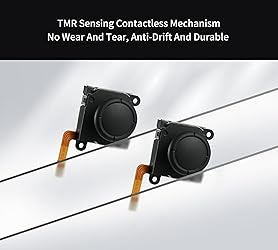
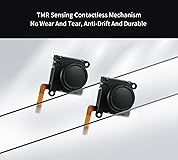
GuliKit Switch Joysticks Replacement, Updated Anti-Drift TMR Electromagnetic Joystick For Switch LCD/OLED Joy Con & Switch Lite, Analog Thumbstick Upgrade Kit With Multiple Color Stick Caps
Detalles del producto
Disponibilidad
En stock
En stock
Peso con empaque
0.20 kg
0.20 kg
Devolución
Si
Si
Condición
Nuevo
Nuevo
Producto de
Amazon
Amazon
Viaja desde
USA
USA
Sobre este producto
- GuliKit TMR Joystick Replacement for Switch Joycon GuliKit joysticks for switch controller
₡ 14,064
IMPORT EASILY
By purchasing this product you can deduct VAT with your RUT number
₡ 14,064
 Llega en 5 a 10 días hábiles
Con envío
 Tienes garantia de entrega
Este producto viaja
de USA ![]() a tus manos en
a tus manos en
![]()
 a tus manos en

Conocé más detalles
More advanced TMR joystick solution: Further evolved based on GuliKit patented Hall Effect joystick technology, GuliKit has brought patented TMR (Tunnel Magnetoresistance) joystick technology to Switch console. Featured with more benefits like less power consumption and more stability than Hall Effect joystick, the TMR thumb stick kit same works with contact-less magnetic field sensing mechanism to eliminate stick drift cause,while can bring better gaming experience. It is compatible with Switch LCD/OLED Joy Con and Switch Lite. Drop in with no hassle: Installing GuliKit TMR Joystick Replacement for Joy-Con is easy for its module design. The perfect replacement design allows you to drop in the new joysticks with no hassle. It is the same installation process as the Hall sense joystick with no complicated tools or technical expertise required. Four colors stick cap sets included: With remove-able stick cap design, you can choose freely to install the stick knob out of four colors (black,red,blue and white) easily to match your Switch color and meet your preference.Follow the guide and change quickly in seconds. A must upgrade for your Switch:The Switch Joysticks designed with a simpler and more reliable structure. It has high-resolution without regular carbon film joystick jittering issue. Joystick Calibration Required After Replacement: Please follow the steps below: 1.Go to System Settings on your Switch and perform Joystick Calibration. 2.Completely power off the Switch, then turn it back on. Plz do not use Sleep Mode. Restarting from sleep will not complete the calibration properly.
Compra protegida
Disfruta de una experiencia de compra segura y confiable
![]() Garantía de entrega
Garantía de entrega
Con Tiendamia todas tus compras cuentan con Garantía de Entrega o devolución total de tu dinero.
Compras 100% seguras y garantizadas, para que pidas lo que sueñas y lo recibas del mundo a tu puerta.
Tarjetas de Débito y Crédito
Pagando en Colones ( ₡ )

Visa

Mastercard

American Express
Pagos a través de PayPal
Compra procesada en dólares con dinero en cuenta o tarjetas internacionales.

PayPal

