


 Garantía de entrega






Artículo: AMZ-B0DSKW6C3V
Esaytool
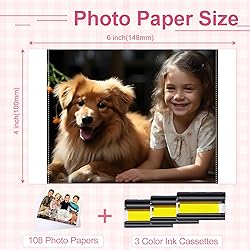
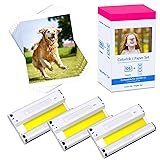
Compatible for Canon Selphy CP1500 CP1300 Ink and Paper 4x6 KP-108IN KP108IN Compatible with Selphy CP CP910 CP780 CP760 CP1200 CP740 CP1000 Printer 108 Sheets Photo Paper 3 Color Ink Cartridges Set
Style:
3 Cartridges · 108 Prints
Detalles del producto
Disponibilidad
En stock
En stock
Peso con empaque
0.80 kg
0.80 kg
Devolución
Si
Si
Condición
Nuevo
Nuevo
Producto de
Amazon
Amazon
Viaja desde
USA
USA
Sobre este producto
- Warm tips: 1. Don't touch glossy paper within the print area. 2. If the kp-108in ink cartridge ribbon is loose, it is best to tighten the ink roller before installation to avoid jamming. 3. Install the ribbon after turning on the printer, and then removing it when you finished the printing, it can effectively avoid waste of ribbon. 4.There is a film on top of the photo paper, and each sheet can only be printed once, don't reuse. Compatible with Canon Photo Printers Selphy CP Series: CP1500, CP1300, CP1200, CP1000, CP910, CP900, CP820, CP810, CP800, CP790, CP780, CP770, CP760, CP740, CP730, CP720, CP710, CP600, CP510, CP400, CP330, CP300, CP220, CP200, CP100 etc.
₡ 21,429
5% OFF
₡ 20,397
IMPORT EASILY
By purchasing this product you can deduct VAT with your RUT number
₡ 21,429
5% OFF
₡ 20,397
 Llega en 5 a 10 días hábiles
Con envío
 Tienes garantia de entrega
Este producto viaja
de USA ![]() a tus manos en
a tus manos en
![]()
 a tus manos en

Conocé más detalles
Package Information: Included 3 ink cassettes + 108 sheets glossy photo paper. Each ink cartridge prints 36 sheets of photo paper, and 3 cartridges print a total of 108 sheets. Paper Size: 4" x 6" (100mm x 148mm). High Definition Printing: Adopting thermal sublimation dye printing technology, which can realize vivid color and delicate photo effect. three-layer printing to magnetize the three primary colors of yellow, red and blue, the color reproduction is more accurate and the image stays truer. Quick Drying & Lamination: Photos dry immediately after printing without smudging, they are automatically laminated to preserve vivid colors and keep it long. Print color photos to record every beautiful moment in your life. Compatible with Canon Selphy Printers CP Series: CP1500, CP1300, CP1200, CP1000, CP910, CP900, CP820, CP810, CP800, CP790, CP780, CP770, CP760, CP740, CP730, CP720, CP710, CP600, CP510, CP400, CP330, CP300, CP220, CP200, CP100 etc. Notes on Use: Before installing the ink cartridge, if the ink cartridge is loose, it is best to tighten the ink roller first to avoid paper jams during printing.
Compra protegida
Disfruta de una experiencia de compra segura y confiable
![]() Garantía de entrega
Garantía de entrega
Con Tiendamia todas tus compras cuentan con Garantía de Entrega o devolución total de tu dinero.
Compras 100% seguras y garantizadas, para que pidas lo que sueñas y lo recibas del mundo a tu puerta.
Tarjetas de Débito y Crédito
Pagando en Colones ( ₡ )

Visa

Mastercard

American Express
Pagos a través de PayPal
Compra procesada en dólares con dinero en cuenta o tarjetas internacionales.

PayPal

