




 Garantía de entrega


Jane eyre
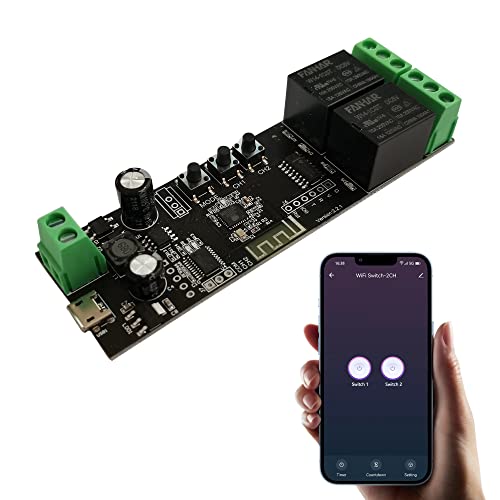
Jane Eyre 2 Channel WiFi Momentary/Self-Locking Relay Switch Module DC 7-32V DIY Switch Module TUYA/SmartLife APP Remote Switch Relay Compatible with Alexa Echo Google Home
Size:
Tuya-2CH
Tuya-1CH
Tuya-1CH+433 RF remote control
Tuya-2CH
Tuya-2CH+433 RF remote control
Tuya-4CH
Tuya-4CH+433 RF remote control
eWeLink-1CH+433 RF remote control
eWeLink-4CH
Color:
Tuya Smart / Smart Life APP


Disponibilidad
En stock
En stock
Peso con empaque
0.20 kg
0.20 kg
Devolución
Si
Si
Condición
Nuevo
Nuevo
Producto de
Amazon
Amazon
Sobre este producto
- Voice Control & Remote Control: You can use Tuya Smart/Smart Life APP on Android and iOS to turn on/off electronic devices from anywhere. This WiFi switch works with Alexa/Google Assistant, you can use voice control to turn on/off home appliances.
- Working mode: There are 3 modes to choose from, instantaneous, self-locking and interlocking. In momentary, latching mode, specific modes can be set for each channel. (The instantaneous time is adjustable, 1-60 seconds)
- In momentary mode, if you press a button in the app (or a manual button on the dev board), the switch will turn on and after 1 second it will automatically turn off. In self-locking mode, press the button on the APP (or the manual button on the panel), and the relay will be turned on. When the button is pressed again, the relay turns off. In interlock mode, turning on one relay will keep the other relays "off".
- DIY your smart home, smart lights, fans, garage doors, humidifiers, thermostats and more. Tuya Smart/Smart Life APP also provides other functions such as scheduling, device sharing and group management. You can also set up routines on Alexa or Google Home for easy access.
- WiFi Settings: Only supports 2.4G WiFi network connection, does not support 5G WiFi! Download Tuya/Smart Life APP and register an account. Then follow the instructions to complete the WiFi configuration. (You may need a WiFi extender if you want to install it somewhere with a weak WiFi signal.)
₡ 12,450
IMPORT EASILY
By purchasing this product you can deduct VAT with your RUT number
₡ 12,450
Llega en 10 a 15 días hábiles
Con envío
 Tienes garantia de entrega
Este producto viaja
de USA ![]() a tus manos en
a tus manos en
![]()
 a tus manos en


Compra protegida
Disfruta de una experiencia de compra segura y confiable
![]() Garantía de entrega
Garantía de entrega
Con Tiendamia todas tus compras cuentan con Garantía de Entrega o devolución total de tu dinero.
Compras 100% seguras y garantizadas, para que pidas lo que sueñas y lo recibas del mundo a tu puerta.
Tarjetas de Débito y Crédito
Pagando en Colones ( ₡ )

Visa

Mastercard

American Express
Pagos a través de PayPal
Compra procesada en dólares con dinero en cuenta o tarjetas internacionales.

PayPal
Conocé más detalles
WiFi smart switch, DIY smart home Through Tuya Smart/Smart Life APP, you can remotely control your home appliances anytime, anywhere. WIFI control mode, no programming required. feature: Two operating voltages: USB 5V and AC/DC 7-32V Control mode: App control, manual control. Transmission method: Wi-Fi communication Wireless standard: 2.4GHz, 802.11 b/g/n Note: The relay is a switch without output, and the power input (AC/DC) is PCBA only. Manually click the working mode button, the product can change the working mode. 1. Momentary mode: Two wiring methods can be selected, - automatically shut down after 1 second of power on, and automatically power on after 1 second of power off. 2. Self-locking mode: Turn on/off 4 connected devices separately. 3. Interlocking mode: every time one device is turned on, other devices are turned off at the same time.(Only supports 2-channel and 4-channel) Supported features include: * Remote On/Off * Scheduled * Device sharing * Group management * Compatible with Amazon Echo, Echo Dot, Amazon Tap * Compatible with Google Home, Google Nest Package Contents: 1 * WiFi Repeater Module, 1 *User Manual (English) This product is compatible with Amazon Alexa. You can ask Alexa to control your device using the following voice commands. Note that only English and German voice commands are supported for US/UK right now. Try these phrases ({deviceName} should be the name of your device): "Alexa, turn on {deviceName}" "Alexa, turn off {deviceName}" You can also let Google Home use the following voice commands to control your device. "Hey Google, turn on {deviceName}." "OK, Google, turn off {deviceName}."

