


 Esta súper oferta termina en


 Garantía de entrega





Artículo: AMZ-B0CWGG18KX
SHANGZHAOYUAN
SHANGZHAOYUAN H110 LGA 1151 Motherboard for Intel 6-9th Gen Core i3/i5 Pentium, Celeron Series Processors, DDR4, PCIe x16, NVME/NGFF M.2, VAG, HDMI-Compatible, SATA 6Gbps
Detalles del producto
Disponibilidad
En stock
En stock
Peso con empaque
0.57 kg
0.57 kg
Devolución
Si
Si
Condición
Nuevo
Nuevo
Producto de
Amazon
Amazon
Viaja desde
USA
USA
Sobre este producto
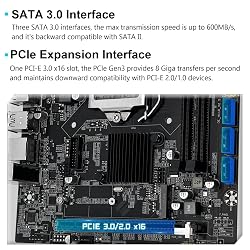
- SHANGZHAOYUAN H110 motherboard compatible with Intel LGA 1151 socket processors Tips:1. Support timed boot, diskless (two modes), network wakeup2. Doesn't support power interuption recovery LGA 1151 SocketSupports Intel 6/7/8/9 generation Core i3/i5, Pentium, Celeron series processors. Dual Channel DDR4Supports DDR4 desktop memory, up to 32GB, and supports 2133/2400MHz memory clock speed.(Supports 2666/3000/3200MHz, but only up to 2400MHz) PCIe X16One PCIe X16 interface, which requires the CPU to support PCle 3.0 technology to achieve 3.0 speed. SATA 3.0The hard drive reads and writes faster, with maximum transfer speeds of 600M/s. VGA; HDMI-compatibleSupports 1080P and 2K HD display. M.2 SlotSupports NVME M.2 and NGFF/SATA M.2 hard drives.The initial mode is NVME M.2, the data transfer speed is up to 1748M/S via PCIe 2.0 x4 bandwidth. When switching to SATA M.2, the data transfer speed is up to 6Gbps. H11O Motherboard SpecificationChipset: Intel H110 ChipsetCPU Socket: LGA 1151RAM Slot: 2*DDR4 (Max 32GB)Memory Clock Speed: 2133/2400MHzUSB Port: Rear (6*USB 2.0); Front(1*USB 3.0, 1*USB 2.0)Network: Realtek 8111H GigabitAudio: Realtek ALC887 2.1 channelM.2 Slot: 1*NVME/NGFF M.2PCIe Slot: 1*PCIe X16Display Interface: HDMI-compatible, VGAPower Connector: 24Pin+8Pin DCFAN Interface: 1*4Pin System FAN, 1*4Pin CPU FANSATA Interface: 3*SATA 3.0Startup item shortcut: F7Size: 197mm*170mm
₡ 40,927
5% OFF
₡ 38,973
IMPORT EASILY
By purchasing this product you can deduct VAT with your RUT number
★ APPLIES FRANCHISE
₡ 40,927
5% OFF
₡ 38,973
 Llega en 5 a 10 días hábiles
Con envío
 Tienes garantia de entrega
Este producto viaja
de USA ![]() a tus manos en
a tus manos en
![]()
 a tus manos en

Conocé más detalles
LGA 1151 Socket: The Intel H110 Motherboard is compatible with Intel 6th/7th/8th/9th gen Core i3/i5, Pentium, Celeron Series processors. (Eg Core i3-6320, i3-7100, i3-7300, Core i5-6500, i5-6600, i5-7600, etc.) Warm Tips: It may not be compatible with i7 processors, please confirm whether your processor model is compatible before purchasing Dual-Channel DDR4 Slot: The LGA1151 Gaming Motherboard is equipped with 2 DDR4 RAM slots, supports Non-ECC memory and the maximum memory capacity is 32GB(2x16GB). And supports 2133/2400MHz memory clock speed NVME/NGFF M.2 Interface: NVME/NGFF M.2 Interface: NVME M.2 and SATA M.2 modes can be manually switched. The two modes use different lanes; NVME M.2 mode uses a PCIe 2.0 x4 lane, while the NGFF M.2 slot uses a SATA lane Video Interface: The Intel Motherboard is equipped with VGA and HDMI-compatible interfaces, which can support 1080P high-definition video output without an external graphics card. Note: To use these two interfaces, your CPU needs to support integrated graphics PCIe Slot: The computer motherboard provides 1 PCIe X16 slot. The PCIe standard is determined by the CPU, and under the PCIe 3.0 protocol, the X16 slot has a throughput of 128Gbps Package Includes: 1*SATA cable, 1*I/O baffle, 1*motherboard. IMPORTANT: The package does not include the user manual. If you need the manual file, please download it from product description page or ask us on Amazon to get it. The motherboard does not include a CR2032L battery, you need to buy the CR2032L battery yourself. Tips 1: If the motherboard does not boot and the fan does not work, please check whether the motherboard power supply and CPU power supply are correctly connected, whether the CPU model and memory model are compatible or good, and whether the memory module is installed in the correct position. If it still does not start after eliminating the above problems, please clear CMOS Tips 2: If there is no display (the fan is working, the Caps Lock key on the keyboard is pressed, and the keyboard light is off), please check whether the motherboard power supply and CPU power supply are correctly connected, check whether the memory module is installed in the correct position, and check whether the CPU and memory models are compatible and good. If there is still no display after eliminating the above, please clear CMOS Tips 3: If there is no display (the fan is working, the Caps Lock key on the keyboard is pressed, and the keyboard light is on). Please check whether the monitor is turned on and whether the display data cable is connected properly. If no external graphics card is installed, please check whether the CPU supports integrated graphics. If an external graphics card is installed, please check whether the data cable is correctly connected to the interface of the external graphics card. Check whether the display data cable, graphics card and monitor are in good condition. If there is still no display after eliminating the above, please clear CMOS
Compra protegida
Disfruta de una experiencia de compra segura y confiable
![]() Garantía de entrega
Garantía de entrega
Con Tiendamia todas tus compras cuentan con Garantía de Entrega o devolución total de tu dinero.
Compras 100% seguras y garantizadas, para que pidas lo que sueñas y lo recibas del mundo a tu puerta.
Tarjetas de Débito y Crédito
Pagando en Colones ( ₡ )

Visa

Mastercard

American Express
Pagos a través de PayPal
Compra procesada en dólares con dinero en cuenta o tarjetas internacionales.

PayPal

