


 Esta súper oferta termina en


 Garantía de entrega





Artículo: AMZ-B0D7MKMC4J
HKUXZR
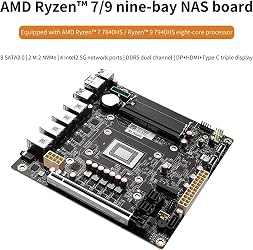
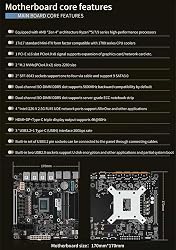
NAS Motherboard AMD Ryzen 7 8845HS, Firewall VPN Router DIY, 4 Port i226-V 2.5GbE LAN, 2xDDR5, 2*M.2 NVMe PCIE X16, 9*SATA3.0, HDMI2.0 DP USB4 Type-C, ITX 17x17CM.+2×SFF8643 to 4 * SATA Data Cable
Detalles del producto
Disponibilidad
En stock
En stock
Peso con empaque
0.50 kg
0.50 kg
Devolución
Si
Si
Condición
Nuevo
Nuevo
Producto de
Amazon
Amazon
Viaja desde
USA
USA
Sobre este producto
- 1. Must work with a good radiator 2. Must connect 24pins+8pins ATX 12V power suppy at the same time to power on. 4. Every new motherboard was tested with radiator totally before shipping, that is why copper plate seems to get traces of thermal grease. 5. Intel i226-V is a new network card, suggest to install newest version of following systems with supportable kernel: pfSense-CE 2.7, OPNsense 23.x, pfSense Plus, OpenWrt, ESXi, Proxmox 8.x, CentOS etc. Please make clear before buying. 9-Bay NAS Mini-ITX Motherboard 4x i226-v 2.5GbE Ports, R7 8845HS 8-core 16 threads, up to 5.1GHz, 2x DDR5, 2x M.2 NVMe PCIe 4.0*2 2280, 1x SATA3.0, 2x SFF-8643(8x SATA3.0 6Gb/s), Triple 4K Display, HDMI2.0, DP1.4, 3x USB3.2, 1x Type-C (USB4)40Gb/s
₡ 284,034
IMPORT EASILY
By purchasing this product you can deduct VAT with your RUT number
★ APPLIES FRANCHISE
₡ 284,034
 Llega en 5 a 10 días hábiles
Con envío
 Tienes garantia de entrega
Este producto viaja
de USA ![]() a tus manos en
a tus manos en
![]()
 a tus manos en

Conocé más detalles
Powerful Processor--9-Bay NAS board is compatible with AMD Ryzen7 Series 8845HS 8-core 16-threads, 16MB Cache, up to 5.1GHz, it's 6.7" x 6.7" mini-ITX form factor, basic TDP is 35-54W, and it supports Windows 10/11, Linux. 【Industrial NAS Motherboard 】Mini-1TX size: 17.0 cm x 17.0 cm,High-density moisture-proof fiber circuit board Ultrafast Connectivity--1* USB3.0, 1* Type-C(USB2.0), 2* USB2.0, 2* built-in USB on board for for USB booting of the NAS system. 1* HDMI2.1 and 1* DP1.4b to support dual 4K@60Hz display. 【 Storage and Memory】2* DDR5 slots, compatible with 4800/5200/5600MHz (non-ECC), RAM supports up to 64GB, 9* SATA3.0 with 6Gbps 2x SFF-8643(8x SATA3.0 6Gb/s) 1x SATA3.0 and 2* M.2 NVMe 2280 PCIE3.0x1, stable and ultra-fast transfer speed.Dual 4K Display: This mini-ITX board has HDMI2.0 and DP1.4 ports at 4K@60Hz. NOTE: The motherboard requires both 24PIN + 8PIN power connections to power up. It will take a few minutes for the motherboard to read the memory information when you first turn on it, please be patient. If you need to go to the BIOS page, keep pressing "DEL" while booting up
Compra protegida
Disfruta de una experiencia de compra segura y confiable
![]() Garantía de entrega
Garantía de entrega
Con Tiendamia todas tus compras cuentan con Garantía de Entrega o devolución total de tu dinero.
Compras 100% seguras y garantizadas, para que pidas lo que sueñas y lo recibas del mundo a tu puerta.
Tarjetas de Débito y Crédito
Pagando en Colones ( ₡ )

Visa

Mastercard

American Express
Pagos a través de PayPal
Compra procesada en dólares con dinero en cuenta o tarjetas internacionales.

PayPal

