


 Esta súper oferta termina en


 Garantía de entrega


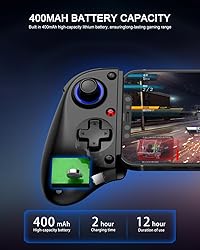




Artículo: AMZ-B0FJFG77R5
Guangli Hechuang Technology Co.. Ltd.
Bluetooth Mobile Game Controller for Nintendo Switch 2 & iOS & Android & Tablets, Wireless Gamepad Grip with Hall Effect Trigger Joystick, Ergonomic Phone Controller for iPhone, iPad Pro, Samsung
Detalles del producto
Disponibilidad
En stock
En stock
Peso con empaque
0.28 kg
0.28 kg
Devolución
Si
Si
Condición
Nuevo
Nuevo
Producto de
Amazon
Amazon
Viaja desde
USA
USA
Sobre este producto
- Bluetooth Mobile Game Controller for Nintendo Switch 2 & iOS & Android & Tablets, Wireless Gamepad Grip with Hall Effect Trigger Joystick, Ergonomic Phone Controller for iPhone, iPad Pro, Samsung
₡ 15,019
IMPORT EASILY
By purchasing this product you can deduct VAT with your RUT number
★ APPLIES FRANCHISE
₡ 15,019
 Llega en 5 a 10 días hábiles
Con envío
 Tienes garantia de entrega
Este producto viaja
de USA ![]() a tus manos en
a tus manos en
![]()
 a tus manos en

Conocé más detalles
TURBO FUNCTION This MFi wireless controller has a turbo function, you can adjust the turbo button according to your needs and achieve one-click bursts, programming buttons are designed on the behind of the stretched gamepad, support macro programming, customise personalised game. making it easier for you to win in FPS games, and it is a good helper for you to play games. Hall effect joystick and linear trigger: mobile controller is with hall effect joystick, high precision, stable performance, faster response speed and long service life. Linear trigger has such high fluidity and response speed that gives you a competitive advantage in any game. ERGONOMIC DESIGN: Game accessory controllers are ergonomically designed to ensure flawless control and execution. The shape of the gamepad fits naturally in the hand, so you can better immerse yourself in the fun even during prolonged use. 360° rotating joystick analog sticks and trigger buttons ensure precise accuracy and comfort as well as increased sensitivity so you can better control your gaming remote control. Supports controllers up to 11 inch: Scalable design supports most tablets such as 11 inch iPad Pro (M5), 11 inch iPad Air (M3), iPad (A16), iPad mini (A17 Pro), 11 inch iPad Pro (M4), 11 inch iPad Pro 4/3/2/1, for Samsung, Lenovo, Amazon, Huawei tablets etc. (Not compatible with the 12.9-inch iPad Pro and 13-inch iPad Air) Support multiple devices: mobile game controller support for iOS +/Android +/Win +/Switch/PS/Steaming, for iPhone/iPad/Macbook/Android phone/tablet, for iPhone 17.16.15.14.13.12 Plus/Pro/Pro Max, iPhone 17/16/15/14/13/12/11/10/9, for Samsung/OPPO/realme/xiaomi, for Switch1/2/Lite/Oled, PS3/PS4, PC, Cloud Gaming [Does not support Apple TV&iPod, Fire TV/TV Box] Precautions: When connecting the controller via Bluetooth, it is necessary to follow the instructions in the manual. For example, in Android mode (Samsung phones, Google phones, Redmi phones, etc.), when connecting the controller, you need to hold down the 'X' button, then press the 'HOME' button to enter standard Android mode. After a successful connection, the controller indicator light will stay on [orange]. For iOS MFi mode (iPhone), hold down the 'B' button, then press the 'HOME' button, and after 2 seconds, it will enter iOS MFi mode. After a successful connection, the controller indicator light will stay on [purple]. For other modes, please refer to the manual.
Compra protegida
Disfruta de una experiencia de compra segura y confiable
![]() Garantía de entrega
Garantía de entrega
Con Tiendamia todas tus compras cuentan con Garantía de Entrega o devolución total de tu dinero.
Compras 100% seguras y garantizadas, para que pidas lo que sueñas y lo recibas del mundo a tu puerta.
Tarjetas de Débito y Crédito
Pagando en Colones ( ₡ )

Visa

Mastercard

American Express
Pagos a través de PayPal
Compra procesada en dólares con dinero en cuenta o tarjetas internacionales.

PayPal

