


 Esta súper oferta termina en


 Garantía de entrega




Artículo: AMZ-B0GSDZMY8W
NHO
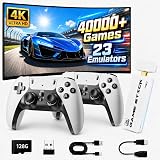
2026 Upgraded Retro Gaming Stick Pro, 40,000+ Retro Game Console, 23 Emulators, 128GB Built-in Classic Video Games, 4K HDMI Plug and Play TV Gaming System, 2 Wireless Controllers for Family Entertainment
Color:
white
Detalles del producto
Disponibilidad
En stock
En stock
Peso con empaque
0.45 kg
0.45 kg
Devolución
Si
Si
Condición
Nuevo
Nuevo
Producto de
Amazon
Amazon
Viaja desde
USA
USA
Sobre este producto
- Main Function 1.List: All the Games and simulators in the folder will be displayed on this page, with up and down selection and left and right page turning (in what simulator the game is in,there will be prompts on the screen). 2. Classification: Identify all simulators contained in the machine. 3. History: After playing,the game record will be in this interface. 4. Collection: Your favorite games can be added to the collection list.5. Search: filter the game according to the game name uppercase letters(Note:case insensitive) How to Connect to Your TV Step 1 Connect to TV: Please use the HDMI extension cable provided to plug the retro video game console into your TV/Computer/projectors HDMI interface to ensure there is no blockage between the retro stick and the gamepads. And switch TV mode to HDMI mode. Note: If plug the retro stick directly into your TV/Computer/projectors HDMI interface without an HDMI extension cable, the controller signal will be poor and the retro stick will get clogged, resulting in gamepad non-working. Step 2 Insert the Controller wireless receiver to the retro gaming stick, and make sure there is no blockage between the controller signal receiver and the gamepad. Note: If the wireless receiver is not plugged in properly, the retro stick will not be able to receive a signal, which will cause the gamepad doesn't work. Step 3 Power Supply: Connect with a charging adapter (Not included) and the power will turn on automatically. Note: Please use a 5V/1A or higher power adapter to provide power to the retro stick. When retro gaming consoles don't work properly or games lag, a big reason is that the power is not available from the USB port. It is recommended to connect with the adapter of the phone charger, the power supply will be relatively stable. Please do not use the fast charger for power supply. Step 4 Install 2 AAA batteries (Not included) on each gamepad and turn on the switch, you're ready to play. Note: If the gamepad is not equipped with battery power, the gamepad will not work. Specification Material: plastic and metal / Plug: USB / Joystick type: 2PCS Controllers Output: HDMI Output / Support Up to 2 Players Input Power: USB 5v Operating Temperature: 0~40℃ Distance: 0~10 meters Notice: Please read the instructions carefully, packaging and the instruction contain important information,please keep the spare. Packing List 2 X Game Console 1 X Retro Stick 1 X USB Cable 1 X HDMI Extension Cable 1 X TF Card 1 X User Manual TROUBLESHOOTING If the retro stick does not work, please follow these steps to check that the device is properly connected: 1. Check whether the switch of the gamepad is in the ON state. 2. Check whether the gamepad is lit red or green (red for player 1, green for player 2); 3. Check whether the Bluetooth wireless receiver is well inserted into the retro stick; 4. Check whether the stick lights up blue; 5. If the connection is correct, the primary gamepad(player 1) is red and the secondary gamepad (player 2)is green. 6. If the traffic lights are flashing at the same time, it means that the battery is low or the wireless receiver has not been successfully connected. (1) If the battery is low, replace the batteries of the gamepad. (2) If the Bluetooth wireless receiver connection is not successful, (may not be able to read the retro stick), please pull out the wireless receiver in the shutdown state and reinsert.
₡ 41,885
35% OFF
₡ 27,186
IMPORT EASILY
By purchasing this product you can deduct VAT with your RUT number
★ APPLIES FRANCHISE
₡ 41,885
35% OFF
₡ 27,186
 Llega en 5 a 10 días hábiles
Con envío
 Tienes garantia de entrega
Este producto viaja
de USA ![]() a tus manos en
a tus manos en
![]()
 a tus manos en

Conocé más detalles
2026 New Game Console Stick: Discover the Gaming Boy wireless TV game console, featuring over 40,000 classic games across 23 emulators, plus a 128GB TF card. Play instantly with no downloads or installations; internet-free gaming is now a reality. Connect to your TV and immerse yourself in a library of 40,000+ classic titles. (Press SELECT and START simultaneously to return to the main menu.) 4K HDMI Gaming Experience: Dive into 4K HD HDMI gaming with 1080P clarity. With an included HDMI cable, this console is versatile, compatible with a range of displays, including TVs, set-top boxes and projectors. Ensure your display has an HDMI port for seamless connection. The console also supports game save functionality, perfect for on-the-go gaming. Dual 2.4GHz Wireless Controllers: Experience lag-free gaming with our two enhanced 2.4GHz wireless controllers. The Video Game Console allows for two-player simultaneous gameplay, with a wire-free range of up to 40 feet, ensuring uninterrupted play. Instant Plug & Play Retro Gaming: Plug and play simplicity with our retro video game console stick. Connect to power, insert the TV, and switch to the HD channel to access the game list. Setup steps: 1. Link the HD output to your TV. 2. Insert the provided TF game card. 3. Power up with the charging adapter for instant console activation. (4 AAA batteries for 2 controllers not included.) Timeless Gift for All Ages: This plug-and-play video game console is the ultimate entertainment choice, offering a nostalgic journey for those who grew up in the 80s and 90s, and a fun escape for all ages. It's an ideal gift for kids and adults, perfect for birthdays, Thanksgiving, Christmas, or any celebration. Should you encounter any issues, our dedicated after-sales team is available 24/7 to assist you.
Compra protegida
Disfruta de una experiencia de compra segura y confiable
![]() Garantía de entrega
Garantía de entrega
Con Tiendamia todas tus compras cuentan con Garantía de Entrega o devolución total de tu dinero.
Compras 100% seguras y garantizadas, para que pidas lo que sueñas y lo recibas del mundo a tu puerta.
Tarjetas de Débito y Crédito
Pagando en Colones ( ₡ )

Visa

Mastercard

American Express
Pagos a través de PayPal
Compra procesada en dólares con dinero en cuenta o tarjetas internacionales.

PayPal

