


 Esta súper oferta termina en


 Garantía de entrega






Artículo: AMZ-B0GTL4J7PB
ONE XPLAYER
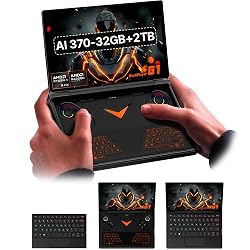
ONEXPLAEYR G1 2-in-1 Handheld Gaming PC & Laptop - AMD Ryzen AI 9 HX 370-32GB+2TB, 8.8" 2.5K 144Hz Touch, Up to 8H Battery Life, Win11, Detachable RGB Keyboard, Hall Joystick, WiFi 6E, for Travel/Commute
Size:
AI-370-32GB+2TB
Detalles del producto
Disponibilidad
En stock
En stock
Peso con empaque
1.75 kg
1.75 kg
Devolución
Si
Si
Condición
Nuevo
Nuevo
Producto de
Amazon
Amazon
Viaja desde
USA
USA
Sobre este producto
- ONEXPLAYER G1
₡ 938,468
IMPORT EASILY
By purchasing this product you can deduct VAT with your RUT number
★ APPLIES FRANCHISE
₡ 938,468
 Llega en 5 a 10 días hábiles
Con envío
 Tienes garantia de entrega
Este producto viaja
de USA ![]() a tus manos en
a tus manos en
![]()
 a tus manos en

Conocé más detalles
2-in-1 Powerhouse: Game & Create Anywhere: Seamlessly switch between a powerful handheld gaming PC and a full Windows 11 laptop. Choose the AMD Ryzen AI 9 HX 370 for elite gaming for efficient performance, both paired with 32GB RAM and a 2TB SSD. Stunning 8.8” 2.5K 144Hz Touchscreen: The vibrant, high-refresh-rate touchscreen is perfect for both immersive gaming and laptop-mode productivity. Enjoy buttery-smooth visuals, sharp details, and intuitive touch controls. Dual-Mode Design with Detachable RGB Keyboard: The magnetic, detachable RGB backlit keyboard instantly transforms your device. Clip it on for work or creativity, detach it for pure handheld gaming—all with customizable RGB lighting. All-Day Hybrid Use with 8-Hour Battery: The 51.9Wh battery supports up to 8 hours of mixed use. Game for hours, then switch to laptop mode for work or streaming without worrying about finding an outlet. Complete Portable Workstation: More than a gaming device, it’s a full PC with WiFi 6E, Bluetooth 5.2, Hall Effect joysticks for precision control, and a gyro sensor, ready for gaming, remote work, and content creation on the go. ONEXPLAYER G1's Factory reset: Here's the instruction of a simply re- installation to resolve software/driver issues: 1, Long press power button for 2-3 seconds to boot your laptop. Press Home+ (volume+ ) when you see power led on.Then you can enter the BIOS pages. 2, Choose the "UEFI OS" Firmware on the boot Override of page "Save & Exit". 3, Touch the "recovery" Icon on the screen when you log in the WIN PE system and then wait for the automatic reinstallation process,all problem resolved
Compra protegida
Disfruta de una experiencia de compra segura y confiable
![]() Garantía de entrega
Garantía de entrega
Con Tiendamia todas tus compras cuentan con Garantía de Entrega o devolución total de tu dinero.
Compras 100% seguras y garantizadas, para que pidas lo que sueñas y lo recibas del mundo a tu puerta.
Tarjetas de Débito y Crédito
Pagando en Colones ( ₡ )

Visa

Mastercard

American Express
Pagos a través de PayPal
Compra procesada en dólares con dinero en cuenta o tarjetas internacionales.

PayPal

