


 Garantía de entrega







Dsd tech
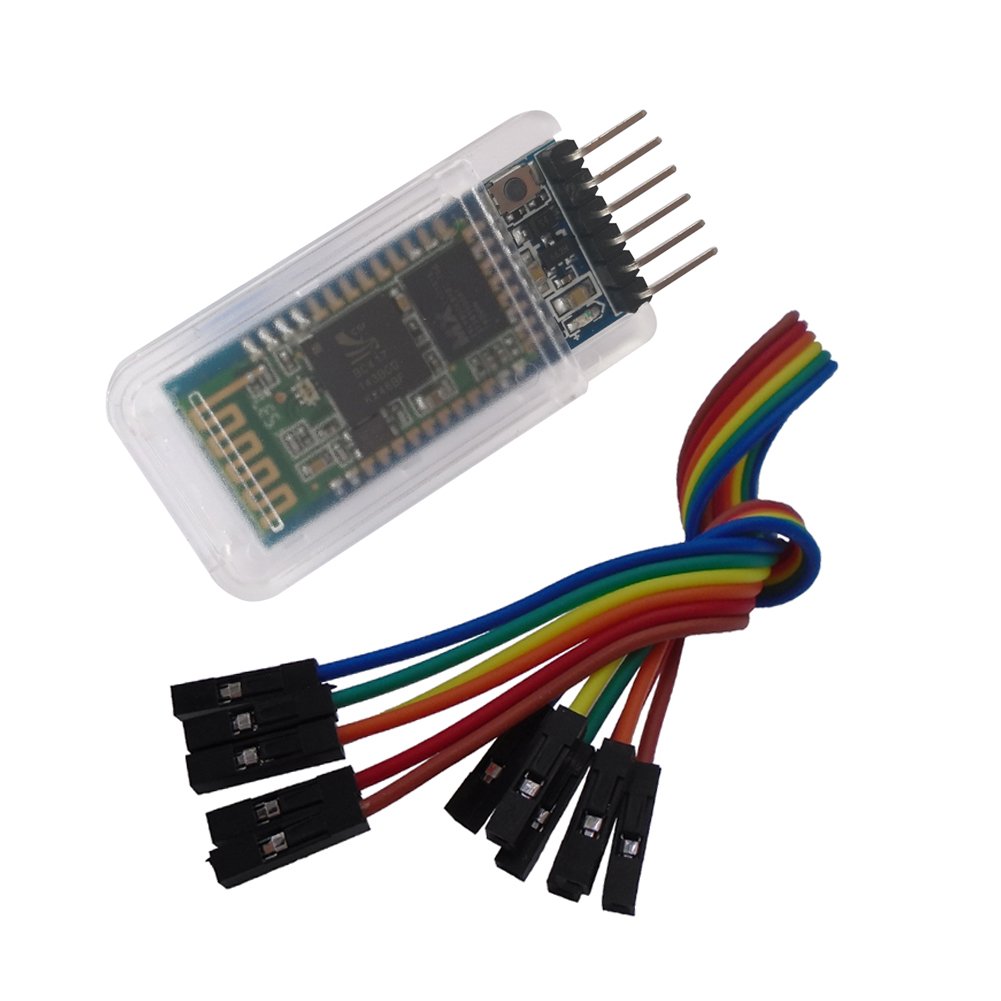
DSD TECH HC-05 Classic Bluetooth 2.0 Serial Wireless Module for UNO R3 Nano (Basic Version)
Disponibilidad
En stock
En stock
Peso con empaque
0.20 kg
0.20 kg
Devolución
Si
Si
Condición
Nuevo
Nuevo
Producto de
Amazon
Amazon
Sobre este producto
- HC-05 Wireless BT Module: with this HC 05 Bluetooth module,You can quickly add the Bluetooth feature to your DIY project, and then you can use your android phone to control some gadgets, such as: switch, LED.
- Master and Slave 2-IN-1 HC 05 Module:Working Voltage 3.6V to 6V , Default baud rate:9600,Default pin:1234
- Button: Press the button, the module enter the AT mode. AT commands are executed only in AT mode.
- 6 PIN Dupont Cable : with this Dupont Cable, you can easily connect this HC-05 Bluetooth module.
- Customer Support: DSD TECH provides permanent technical support and 1 year product replacement service for this Bluetooth 2.0 Serial Wireless Module.All questions will be answered within 1 working day.
₡ 8,319
IMPORT EASILY
By purchasing this product you can deduct VAT with your RUT number
₡ 8,319
Llega en 5 a 10 días hábiles
Con envío
 Tienes garantia de entrega
Este producto viaja
de USA ![]() a tus manos en
a tus manos en
![]()
 a tus manos en


Compra protegida
Disfruta de una experiencia de compra segura y confiable
![]() Garantía de entrega
Garantía de entrega
Con Tiendamia todas tus compras cuentan con Garantía de Entrega o devolución total de tu dinero.
Compras 100% seguras y garantizadas, para que pidas lo que sueñas y lo recibas del mundo a tu puerta.
Tarjetas de Débito y Crédito
Pagando en Colones ( ₡ )

Visa

Mastercard

American Express
Pagos a través de PayPal
Compra procesada en dólares con dinero en cuenta o tarjetas internacionales.

PayPal
Conocé más detalles
The Core module is HC-05 bluetooth 2.0 serial module. By using this HC 05 Bluetooth module , you can quickly add Bluetooth features to your wireless DIY Project. The factory setting is slave mode, but you can set this module to master mode so that you might be able to connect to other Bluetooth 2.0 devices. Please note: This is a classic Bluetooth 2.0 module , it is not compatible with iphone or ipad. If you need to use iphone or ipad to control your DIY project. You may need a Bluetooth 4.0 BLE module (such as SH-HC-08 Bluetooth 4.0 ble module) How to enter the AT command mode Way 1: Step 1: Input low level to PIN34->EN PIN. (it can also be floating) Step 2: Supply power to the module. Step 3: Input high level to the EN PIN(PIN34)(you can press the button this do this action,if you buy HC-05 from DSD TECH) Then the module will enter to AT mode. The baud rate is as same as the communication time, default is 9600 Way 2: Step 1: Connect PIN34(EN PIN) to the power supply PIN.or always press the button . Step 2: Supply power to module Then the module will enter to AT module. But at this time, the baudrate is always 38400. In this way, user should change the baud rate at the AT mode, if they forget the communication baud rate. Package List: 1* HC-05 Module with 6PIN 1* 6PIN Dupont Cable About WARRANTY:DSD TECH back this module with ONE YEAR WARRANTY. If you meet any question, please contact us, we will fix your issue within 24 hours.

